Weather Live - Radar & Alerts
- 4.3
- Rating
- 5.00M
- Installs
- Free
- Price
 Analysis by App-foxy
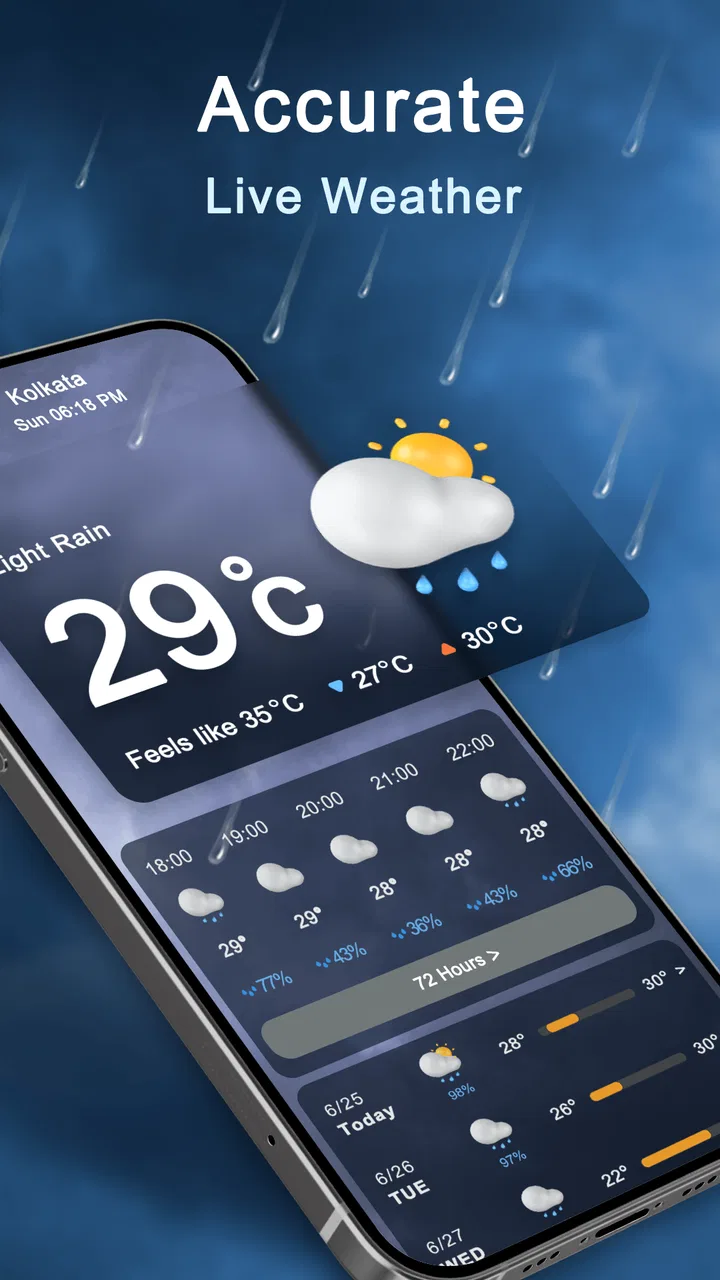
I spent time using Weather Live - Radar & Alerts as a day-to-day weather companion rather than opening it only when a storm was already outside. That distinction matters, because its value is not just the forecast itself. The app brings together daily conditions, rain radar, weather maps, and widgets in one place, so I could check the outlook quickly and then dig deeper when the situation looked uncertain.
My first impression was that it aims to be more useful than the basic weather panel already built into a phone. The interface is centered on information people actually check before leaving home: current conditions, the coming forecast, rain movement, and a glanceable widget. It is a free weather app from HealthTracker Apps, with optional in-app purchases ranging from $1.99 to $9.99 per item. That makes it easy to try without committing money first, although anyone who prefers a completely purchase-free experience should pay attention to which extras are offered during use.
How Weather Live fits into everyday forecasting
The app makes the most sense for people who want more context than a single temperature number. A forecast can say that rain is possible, but a radar view helps answer the practical question: is rain approaching my area soon, or is it passing somewhere else? I found that combination more useful than repeatedly switching between a simple forecast app and a separate map service.
You May Also Like

 Blood Strike: 2.5 Anniversary
Blood Strike’s Loadouts Turn Every Drop Into a Tactical Gamble
A close look at Blood Strike’s custom loadouts: how fast access to signature weapons reshapes its battle royale rhythm, rewards preparation, and narrows the gap between fights.

 Pandora - Music & Podcasts
Pandora’s Music Is Easy to Start, but Harder to Recover
Pandora’s strength is its low-effort path from a seed to a station. Its weak spot is how much confidence it asks you to place in connection, setup, and quiet recovery.

 8 Ball Pool
 Is Built on Rivalries, Rematches, and Routine
A close look at the rivalries, rematches, shared routines, and unanswered safety questions that turn a quick pool match into a persistent mobile community.

 Samsung Music
’s Quiet Strength Is Playing What You Already Own
Its reach comes less from spectacle than from dependable access to a personal library. That simplicity is both the app’s strongest retention engine and its ceiling.

 AccuWeather: Weather Radar
AccuWeather Review: A Quick, Clear Forecast for Everyday Decisions
For everyday plans, the best forecast is the one you can understand quickly. AccuWeather makes rain timing, radar, and local conditions easy to act on, with a few trade-offs.

 Hill Climb Racing
Why Hill Climb Racing Still Turns Crashes Into One More Run
A tiny car, a bumpy hill and one more upgrade: Hill Climb Racing keeps resurfacing because its simple chaos makes every near-miss feel personal.
More From Our News Desk



For a normal weekday, I would check the daily view in the morning, glance at the widget later, and open the radar only when I needed to decide whether to walk, cycle, run an errand, or wait. That workflow is simple, but it avoids one common problem with weather apps: presenting lots of information without helping you make a decision.
The widgets are particularly helpful for people who do not want weather to become another notification demanding attention. A widget can act as a quiet reminder to check conditions before heading out. I would place it where I normally look for calendar or travel information, then use the full app only when the forecast needed closer inspection. This is a better fit for routine planning than constantly opening the app just to see whether the temperature has changed.
At the same time, I would not treat the app as a replacement for local judgement during severe or rapidly changing weather. Radar and forecasts are useful guides, but they should support—not replace—official emergency instructions. That is an important distinction for anyone choosing a weather app primarily for safety alerts rather than everyday planning.
The current experience is strongest when views work together
The most useful pattern is moving from broad to specific. I start with the daily forecast to understand the general shape of the day, use the map to see how conditions are distributed, and then return to the radar when timing matters. Each view answers a different question, and the app feels more worthwhile when I use them as parts of one workflow instead of treating them as separate decorations.
This also reveals one of the app’s trade-offs. A person who only wants the current temperature may find the extra maps and widgets unnecessary. The app is designed for checking, comparing, and planning. If your needs stop at “should I take a jacket?”, a lightweight built-in weather tool may be faster and less distracting.
The app currently appears as version 1.3.0, which gives the product a relatively focused feel rather than the sense of an enormous weather platform with every possible specialist feature. It was released on June 28, 2023, and the current version is compatible with Android devices running version 6.0 or later. That broad system support is useful for people keeping an older phone, although actual smoothness will still depend on the device and its available resources.
What the forecast and radar are good for
The daily forecast is the part I would rely on most often for ordinary decisions: clothing, commuting, outdoor plans, and deciding whether a flexible schedule is sensible. The radar adds value when the forecast feels too general. For example, “rain today” can mean a short shower at an inconvenient time or a wet afternoon that changes an entire plan. A moving weather map gives that statement more practical meaning.
One non-obvious benefit is that radar encourages better timing rather than simple yes-or-no planning. Instead of cancelling a walk because rain is expected sometime during the day, I can check whether there is a clearer window. That is especially useful for school runs, dog walks, short bike trips, and errands where postponing for a little while is realistic.
There is also a useful trade-off between detail and certainty. A map can look precise, but precision on the screen does not guarantee perfect precision in real life. I would use it to compare likely movement and timing, not to assume that a shower will begin or end at an exact minute. The app is most helpful when I treat its visual information as a planning aid rather than a promise.
Weather maps serve a different purpose from radar. I see them as better for understanding the wider pattern—whether a system is moving across a region or whether conditions vary significantly around me. Radar is the more immediate tool when I am deciding whether to leave now. Keeping those roles separate makes the app easier to use and prevents the map screen from becoming a confusing wall of information.
Widgets change how often I need to open the app
The widget support is more than a cosmetic extra because it changes the checking habit. A person who wants a quick answer can see the essential outlook without interrupting whatever they are doing. I would use the widget for routine awareness and reserve the full app for questions that need detail, such as rain timing or a broader weather pattern.
My practical tip is to place the widget on a screen that already supports a daily routine. A weather widget hidden on a rarely used page will not help much. Put it beside a calendar, commute tool, or task list, and it becomes part of the decision you already make each morning. This is a small setup choice, but it determines whether the feature becomes genuinely useful or simply consumes screen space.
Widgets can also expose one of the app’s limitations: glanceable information is necessarily less detailed than the full forecast. If you need to understand changing conditions, the widget will only be the starting point. I would not judge it as a failure for that reason; the point is speed. Still, users who want every detail visible without opening anything may find the format restrictive.
How the app has developed and what that means
The confirmed version information gives existing users a clear reference point: the app is currently at 1.3.0 rather than an early unversioned release. I see that as a sign of an ongoing product rather than a one-off weather screen, but I would separate that observation from any assumption about future plans. A version number tells me where the app is now; it does not guarantee which feature will arrive next.
The product’s evolution is easiest to understand through its combination of forecast, radar, maps, and widgets. Instead of focusing on only one presentation, it covers several levels of checking: quick glance, daily planning, and visual investigation. For someone already using an older version, that broader mix can make the app more useful if the newer build runs comfortably on the phone and the added views match their habits.
For a new user, the current state is more important than the release history. I would install it because the present feature set fits my needs, not because I expect a particular future update. That mindset avoids disappointment and is especially sensible with weather tools, where local accuracy and practical usability matter more than a long list of promised improvements.
The app has attracted an average rating of 4.4 from around 23 thousand ratings and has passed 5 million installs. Those figures suggest that it has reached a substantial audience and that many people find the overall experience worthwhile. They do not prove that every location receives identical forecast quality, so I would still test it against the conditions I know best during the first few days.
Who will benefit most from installing it
I think the app is a strong match for people who regularly make outdoor decisions but do not need a professional meteorology workstation. Commuters, parents planning school travel, casual runners, gardeners, dog owners, and anyone whose plans depend on avoiding short periods of rain can get real value from the combination of forecast and radar.
It is also suitable for someone who wants weather information visible without a constant stream of alerts. The widget-first approach can reduce unnecessary opening and make the app feel like a quiet utility. People using an older Android phone may appreciate the minimum operating system requirement of Android 6.0 or later, since they are not automatically excluded by a newer software threshold.
I would be more cautious if your main requirement is highly specialized weather analysis, detailed historical climate information, or a tool built specifically around official emergency warnings. The app’s strengths are accessible daily forecasting, visual weather checking, and convenience. A specialist service may be better when you need advanced atmospheric information, professional planning tools, or a particular national warning system.
It may also be the wrong choice for someone who dislikes optional purchases in free apps. The download itself is free, but in-app items cost between $1.99 and $9.99 each. That does not automatically make the model unreasonable, yet it means the best experience may depend on which parts are available without payment and which extras appeal to you. I would explore the free experience first rather than assuming every screen is included.
A realistic day with the app
Imagine I have an outdoor appointment after work and a short walk to reach it. In the morning, I check the daily outlook and notice that rain is possible later. Instead of cancelling immediately, I use the widget during the day to keep the situation visible. Before leaving, I open the radar and look at whether the rain pattern is moving toward my route or staying elsewhere.
If the map suggests a temporary gap, I might leave a little earlier or delay the walk. If the wider weather map shows a larger system approaching, I would make a more conservative choice and take waterproof clothing. The app does not make the decision for me, but it reduces the guesswork by putting the relevant views together.
That workflow also shows why I would not rely on a single screen. The daily forecast gives the broad expectation, the widget supports quick monitoring, and the radar provides the timing clue. Skipping the first two and opening only the map can make the experience feel more complicated than it needs to be.
Where the experience still has friction
The biggest weakness is not a missing headline feature; it is the possibility of information overload. Forecasts, maps, radar, and widgets are useful individually, but a new user may need time to decide which view belongs to which question. I recommend starting with the daily forecast and adding radar to your routine only when you have a specific timing problem to solve.
Another limitation is that visual weather tools can create false confidence. A colorful radar display feels authoritative, yet local conditions can change quickly and small variations matter. I would avoid planning a safety-critical activity around a narrow visual gap. For ordinary errands, the detail is helpful; for serious weather risk, official guidance should remain the priority.
The free-to-paid structure may create friction as well. Because the app is free to install but includes optional purchases, users should decide whether the basic experience already covers their needs. If it does, there is no reason to buy extras simply because they are presented. If a paid item removes a specific annoyance or adds a view you genuinely use, the decision becomes easier to judge.
There is also the ordinary limitation of any weather app: the forecast is only as useful as its local performance. I would compare the app with conditions outside for several days, especially in a place with fast-changing weather, coastal effects, hills, or frequent microclimates. A strong general interface cannot compensate for a forecast that does not suit your location.
What I would watch in future updates
Since the current release is 1.3.0, I would watch for improvements that make the existing tools clearer rather than simply adding more screens. Better connections between the daily forecast, radar, and widgets would have the greatest practical effect. For example, the best evolution would be an experience where a quick widget check naturally leads to the exact map view needed for the next decision.
I would also pay attention to how HealthTracker Apps handles the balance between free access and optional purchases. A free weather app can be perfectly worthwhile, but trust depends on users understanding what they can do without paying and what an in-app item changes. Clear presentation would matter as much to me as another decorative weather panel.
For existing users, the sensible approach is to update when the current version works well on the device and to reassess the app after each meaningful change. I would not assume that every update improves every phone equally. On an older handset, stability and loading speed may matter more than an additional visual feature.
For new users, I would begin with a short practical test: set up the widget, check the daily forecast at the times you normally plan your day, and open the radar only when rain is relevant. After several days, you will know whether the app fits your routine or merely gives you more information than you need.
My final recommendation
I recommend Weather Live - Radar & Alerts to anyone who wants a free, approachable weather app with more depth than a basic temperature display. Its best quality is the way it combines everyday forecasting with radar, maps, and widgets, allowing me to move from a quick glance to a more informed decision without changing tools.
I would not choose it automatically for specialist forecasting, emergency response, or users who want a completely purchase-free environment. Those needs call for a more specific alternative. But for commuting, outdoor plans, household routines, and deciding whether rain is worth waiting out, the app offers a useful middle ground.
After using it, my advice is simple: make the widget part of your normal routine, treat radar as a timing aid rather than an exact guarantee, and judge the free experience before considering any optional purchase. With those expectations, Weather Live - Radar & Alerts feels like a practical daily tool rather than another weather app that only gets opened after the sky has already changed.
FAQs for Weather Live - Radar & Alerts
01How accurate is the weather forecast in Weather Live - Radar & Alerts?
Weather Live - Radar & Alerts utilizes advanced meteorological data and forecasting algorithms to provide accurate and up-to-date weather conditions. While forecasts are generally reliable, they are subject to changes due to unpredictable weather patterns. Users can expect real-time updates, but it's always wise to prepare for slight variations.
02Does Weather Live - Radar & Alerts offer severe weather alerts?
Yes, Weather Live - Radar & Alerts provides real-time notifications for severe weather conditions. Users receive alerts for thunderstorms, hurricanes, and other extreme weather events. These alerts are designed to keep you informed and safe, so you can take necessary precautions in advance.
03Can I customize the weather information displayed?
Absolutely! Weather Live - Radar & Alerts allows users to customize their experience by selecting specific data, such as temperature units, preferred locations, and types of weather alerts. This customization ensures that the app delivers the most relevant information tailored to your needs.
04Is Weather Live - Radar & Alerts free to use, or are there in-app purchases?
The app offers a free version with basic features, but there are also in-app purchases available. These premium options unlock additional features such as ad-free usage, advanced radar maps, and detailed weather insights, providing a more comprehensive weather monitoring experience.
05How user-friendly is the interface of Weather Live - Radar & Alerts?
Weather Live - Radar & Alerts boasts a user-friendly interface designed for ease of navigation. The app is intuitive, with clear icons and easy access to various weather features. Even users with minimal tech experience can quickly learn how to navigate and utilize the app’s functionalities effectively.
Pros
- Intuitive and user-friendly interface.
- Detailed weather forecasts and alerts.
- Customizable widgets for quick access.
- Accurate radar maps and animations.
- Supports multiple locations for travelers.
Cons
- Contains ads in the free version.
- Some features require a subscription.
- Occasional loading delays in radar.
- Can drain battery with constant use.
- Initial setup might feel overwhelming.

Weather Live - Radar & Alerts
Gallery